MotionMuse AI Review 2026: Is It Safe, Legit & Worth Using?
Published: 14 May 2026
MotionMuse AI is an AI video generator that helps users turn images into short videos with simple prompts and ready-made templates. It is mainly used for social media content, marketing clips, and quick video creation.
Many people search for a MotionMuse AI review because they want to know if the platform is safe, legitimate, and worth the money. Users often check its free credits, pricing plans, trust score, and real customer feedback before signing up.
The platform offers free credits for new users and paid plans for more features and faster video generation. This makes it useful for both beginners and regular creators.
In this MotionMuse AI review, we will cover its features, pricing, pros and cons, safety, trust score, and the best MotionMuse AI alternatives. This will help you decide if MotionMuse AI is the right tool for your needs.
What is MotionMuse AI?
MotionMuse AI is an online AI video generator that helps users create short videos from images and text prompts. It is a browser-based tool, so you do not need to download any software. You can use it directly from your laptop or mobile browser.
The platform is popular for making social media reels, marketing videos, and creative short clips. It uses artificial intelligence to turn still images into moving videos with effects, motion, and smooth transitions.
Many users like MotionMuse AI because it is simple, fast, and beginner-friendly. Even if you have no editing experience, you can still create videos in just a few minutes.
How MotionMuse AI Works
MotionMuse AI works in a very simple way. First, you upload an image or enter a text prompt based on the video you want to create. Then, the AI reads your input and generates a short animated video.
You can also choose styles, effects, and templates to improve the final result. Afterward, the platform processes your request through its credit system and generates the output.
For example, if you upload a portrait photo, MotionMuse AI can turn it into a moving cinematic clip with visual effects. This saves time compared to manual video editing.
The free version gives limited credits, while paid plans offer more video generation options and faster speeds.
Who Should Use MotionMuse AI
MotionMuse AI is useful for many types of users, especially people who want fast and simple video creation.
- Content Creators: Content creators can use MotionMuse AI to make engaging short videos for YouTube Shorts, TikTok, and Instagram Reels without spending hours editing.
- Marketers: Digital marketers can create quick product videos, ad creatives, and promotional clips for better audience engagement and faster campaign results.
- Beginners: If you are new to video editing, MotionMuse AI is a good starting point. Its simple dashboard makes the process easy to understand.
- Short Video Creators: People who focus on short-form content can save time by using AI-generated motion effects instead of editing everything manually.
- Social Media Users: Even regular social media users can use MotionMuse AI to create stylish videos for personal posts, stories, and online sharing.

Key Features of MotionMuse AI
MotionMuse AI offers several useful features that make video creation fast and simple. It is designed for users who want short videos without learning difficult editing software. From image-to-video creation to ready-made templates, the platform helps beginners and creators save time and effort.
Below are the main features of MotionMuse AI that make it popular among users.
1. AI Image to Video Generation
The most important feature of MotionMuse AI is AI image-to-video generation. You can upload a simple photo, and the tool turns it into a short moving video with smooth motion and visual effects.
For example, if you upload a portrait photo, the platform can create a cinematic-style video for Instagram Reels or TikTok. This helps users create engaging content without manual editing.
2. Text to Video Support
MotionMuse AI also supports text-to-video creation. You only need to write a short prompt, and the AI generates a video based on your idea.
This feature is helpful for users who do not have ready images. For example, a business owner can write a short product idea and quickly create a marketing clip.
3. Browser-Based Video Creation
MotionMuse AI is a browser-based tool, so there is no need to install software. You can use it directly from your laptop or mobile browser.
This makes the platform simple and fast, especially for beginners who want easy access without technical setup.
4. Fast Rendering Speed
Fast rendering is another strong feature of MotionMuse AI. The platform creates short videos quickly, which saves time for daily content creators.
This is useful for people who post regularly on social media and need quick results without long waiting times.
5. Free Credits for New Users
New users get free credits after signing up, which allows them to test the platform before buying a premium plan.
This helps users check video quality, understand the credit system, and decide if MotionMuse AI is worth paying for.
6. Beginner-Friendly Dashboard
The dashboard is clean and easy to use. Users can upload images, write prompts, select effects, and generate videos without confusion.
Even people with no editing experience can use MotionMuse AI without facing technical problems.
7. Premium Templates and Effects
Paid plans offer premium templates, better effects, and more monthly credits for video creation.
These features help creators make higher-quality videos for business promotion, social media growth, and professional content creation.
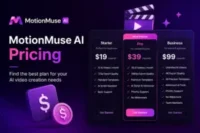
MotionMuse AI Pricing Plans
MotionMuse AI offers different pricing plans based on credits, video limits, and speed. The platform uses a credit system, so every video you generate uses a certain number of credits. You can start free and upgrade anytime when you need more features or higher limits.
1. Free Version Overview
The free version of MotionMuse AI is made for testing the platform. New users usually get 20 free credits, and they can also earn daily bonus credits by logging in.
With the free plan, you can:
- Try basic video generation tools
- Use limited templates
- Create a small number of videos
- Test the credit system before paying
This plan is good for beginners who just want to explore MotionMuse AI without spending money. It helps you understand how the tool works before upgrading.
2. Premium Plans and Credits
MotionMuse AI also offers paid plans for regular users and creators. These plans give you more monthly credits and faster video generation.
Based on official details, common plans include:
- Basic Plan: Around 300 credits per month
- Pro Plan: Around 1500 credits per month
- Premium Plan: Around 3000 credits per month
Higher plans also unlock:
- Faster rendering speed
- Priority video generation
- More templates and effects
- Better usage limits for daily content creation
This makes premium plans useful for marketers, YouTubers, and social media creators who post regularly.
3. Is MotionMuse AI Expensive?
MotionMuse AI is not very expensive compared to other AI video tools. The basic plan starts at a low monthly price, which is good for beginners.
But the cost depends on usage. If you create many videos daily, your credits will finish faster, and you may need a higher plan.
So we can say:
- For beginners → affordable
- For heavy users → can become costly
It depends on how often you use the tool and how many videos you generate.
4. Is There a Refund Policy?
MotionMuse AI has a strict refund policy. According to their terms, payments are usually non-refundable once credits are used.
This means:
- Used credits cannot be refunded
- Subscription payments are also not refundable
- Refunds are only possible in special legal cases
So it is important to test the free version first before buying any plan. This helps you avoid unwanted payments.
MotionMuse AI Pros and Cons
MotionMuse AI has both good and weak sides. It is helpful for quick video creation, but it also has some limits. Below is a simple breakdown of its pros and cons to help you decide clearly.
| Pros |
|---|
|
Simple interface: The platform is very easy to use. You can upload content and create videos without confusion. Fast output: It generates videos quickly. This is helpful for users who need fast content for social media. No software installation: You do not need to install any software. Everything works directly in your browser. Free trial access: New users can try the tool for free using starter credits. This helps you test it before paying. Beginner-friendly: Even if you have no editing experience, you can still create videos easily. The tools are simple and clear. |
| Cons |
|---|
|
Limited free credits: Free credits are not enough for heavy use. You may run out quickly. Short video length: The videos are usually short. This makes it less useful for long content. Quality depends on the uploaded image: If your image is low quality, the final video may also look weak. Credit usage finishes quickly: Each video uses credits, so frequent users may need to upgrade fast. Not suitable for long-form videos: It is mainly built for short clips, not full-length video projects. |
Is MotionMuse AI Safe and Legit?
MotionMuse AI is a growing AI video tool, and many users want to know one thing clearly: Is MotionMuse AI safe or just a scam? Let’s break it down in a simple way so you can decide easily.
1. Scamadviser Trust Score Analysis
Scamadviser shows mixed but mostly positive signals for MotionMuse AI. The platform has a medium to good trust score, and it is marked as likely legit and safe to use.
It also highlights some concerns, like:
- The domain is still new
- Owner identity is hidden (WHOIS privacy)
- Low website traffic compared to older platforms
Overall, Scamadviser does not call it a scam, but it suggests users should stay careful when making payments.
2. SSL Certificate and Security Signals
MotionMuse AI uses SSL security, which means your connection is encrypted. This helps protect your data while browsing or using the tool.
Other security checks also show:
- Secure HTTPS connection
- Safe DNS filtering in most checks
- No major malware warnings found
This is a good sign because secure encryption is standard for trusted online platforms.
3. Domain Age and Website Reputation
One thing to note is that MotionMuse AI is still a new platform. New websites often have:
- Lower trust history
- Limited public reviews
- Short domain age
Because of this, users should test the free version first before upgrading to paid plans. A newer platform is not automatically unsafe, but it needs time to build strong reputation.
4. Trustpilot and User Review Signals
On Trustpilot and other review sites, user feedback is mixed. Some users like the speed and ease of use, while others complain about:
- credit usage limits
- subscription concerns
- output quality differences
So the overall sentiment is average to mixed, not fully negative or fully positive.
This shows that user experience depends on how you use the tool.
5. Is MotionMuse AI a Scam or Legit?
Based on available data, MotionMuse AI looks legit, not a scam. It is a working AI video tool with real features, real users, and active development.
But here is the simple truth:
- It is safe for basic use
- It is not fully risk-free because it is new
- It has mixed user reviews and an unclear long-term reputation
Real User Reviews and Customer Feedback
MotionMuse AI has mixed real user feedback. Some users like its speed and simple tools, while others share complaints about credits, pricing, and output quality. Let’s look at what real users say across Reddit and review platforms.
Positive User Feedback
Many users say MotionMuse AI is helpful for quick content creation. It works well for short videos like TikTok, Instagram Reels, and YouTube Shorts.
From community discussions, users like:
- Fast video generation
- Easy and simple interface
- Good for beginners
- Useful for social media content
Some creators also say it helps them produce ideas quickly without editing skills. It is often used for testing creative video ideas before making final content.
Negative User Complaints
At the same time, many users are not fully satisfied. The most common complaints are about cost and credits.
Users often say:
- Credits finish too fast
- Paid plans feel expensive
- Output is not always consistent
- Sometimes results need multiple tries
Some Reddit users also mention frustration with credit systems and pricing changes in AI tools like MotionMuse AI.
Common Problems Users Mention
Based on real feedback from Reddit and review discussions, these are the most common issues users face:
- Delayed output: Sometimes video generation takes longer than expected, especially during high traffic times.
- Credit issues: Users report that credits finish quickly, even for small experiments or repeated attempts.
- Payment concerns: Some users feel pricing is confusing because everything depends on credits instead of fixed usage.
- Output inconsistency: Video quality can change depending on the image or prompt. Some results look great, while others need multiple tries.
MotionMuse AI vs Other AI Video Tools
MotionMuse AI is a simple AI video generator, but it is not the only option in the market. Many users also compare it with tools like Runway, Pika Labs, Kling AI, and Unlucid AI. Each tool has different strengths, so let’s break them down in a simple way.
MotionMuse AI vs Runway
Runway is a more advanced AI video tool. It is widely used by professionals because it gives better control, camera movement, and high-quality cinematic results.
MotionMuse AI is easier for beginners, but it is limited in advanced editing features.
- Runway = high-quality cinematic videos, advanced controls
- MotionMuse AI = simple, fast, beginner-friendly
👉 If you want professional-level editing, Runway is better. If you want quick and simple videos, MotionMuse AI is enough.
MotionMuse AI vs Pika Labs
Pika Labs focuses on fun, creative, and social media-style videos. It is known for fast generation and stylish effects.
MotionMuse AI also targets social media users but offers fewer creative controls compared to Pika.
- Pika Labs = creative effects, strong social content tools
- MotionMuse AI = simple image-to-video generation
👉 Pika is better for creative storytelling, while MotionMuse AI is better for basic video creation.
MotionMuse AI vs Kling AI
Kling AI is known for strong video quality and realistic motion. It can also create longer and more detailed video clips compared to many tools.
MotionMuse AI focuses more on short and quick video output.
- Kling AI = high-quality, realistic, longer videos
- MotionMuse AI = short videos, fast generation
👉 Kling AI is better for quality-focused users, while MotionMuse AI is better for quick content.
MotionMuse AI vs Unlucid AI
Unlucid AI is another AI video platform that offers more editing flexibility and experimental features. It is often used for creative AI video experiments.
MotionMuse AI is more structured and simpler, with less customization.
- Unlucid AI = creative freedom, experimental tools
- MotionMuse AI = easy and structured video creation
👉 Unlucid AI is better for advanced users, while MotionMuse AI is better for beginners.
Final Comparison Insight
All tools have different purposes:
- MotionMuse AI = best for beginners and quick, short videos
- Runway = best for professional cinematic videos
- Pika Labs = best for creative social media content
- Kling AI = best for high-quality, realistic videos
- Unlucid AI = best for experimental editing
If you are just starting, MotionMuse AI is a simple choice. But if you need advanced quality or creative control, other tools may be better for you.
Best MotionMuse AI Alternatives
MotionMuse AI is a simple AI video tool, but it is not the only option. Many users look for better quality, longer videos, or more free credits. That is why alternatives like Runway, Pika, Kling AI, Pixverse, and Unlucid AI are very popular.
Below are the best MotionMuse AI alternatives you can try.
1. Runway
Runway is one of the most powerful AI video tools. It gives high-quality cinematic videos and advanced editing controls.
It is better than MotionMuse AI for:
- professional video quality
- longer creative control
- advanced editing features
But it can feel complex for beginners.
👉 Best for: professional creators and high-quality video work
2. Pika
Pika is a beginner-friendly AI video generator. It focuses on fast and creative short videos.
It is better for:
- quick social media clips
- simple interface
- fun and creative effects
But video length is usually short.
👉 Best for: beginners and social media creators
3. Kling AI
Kling AI is known for high-quality and realistic motion videos. It often gives better video length and realism compared to many tools.
It is stronger than MotionMuse AI in:
- video realism
- motion quality
- longer clip support
👉 Best for: realistic AI video generation
4. Pixverse
Pixverse is another growing AI video tool. It is popular for fast generation and simple workflows.
It is good for:
- quick video creation
- social media content
- easy beginner use
👉 Best for: fast and simple video creation
5. Unlucid AI
Unlucid AI is more flexible and experimental. It gives users more creative freedom compared to MotionMuse AI.
It is better for:
- creative experiments
- different AI styles
- advanced users
👉 Best for: creative and experimental video work
Final Comparison Insight
Here is a simple guide:
- MotionMuse AI → easiest for basic short videos
- Runway → best for professional quality
- Pika → best for beginners
- Kling AI → best for realistic videos
- Pixverse → best for fast creation
- Unlucid AI → best for creative control
If you want simple and quick videos, MotionMuse AI is fine. But if you want more power, these alternatives are better choices.
Is MotionMuse AI Worth It?
MotionMuse AI can be worth it for some users, but not for everyone. It depends on your needs, budget, and how often you create videos. Let’s break it down in a simple way so you can decide easily.
Best For Beginners?
Yes, MotionMuse AI is a good choice for beginners. The platform is simple and does not need editing skills.
You can:
- Upload an image easily
- Use ready templates
- Generate videos in a few clicks
For example, if you are new to YouTube Shorts or Instagram Reels, you can quickly create videos without learning complex tools.
It is made for people who want fast results, not advanced editing.
Best For Short Content Creation?
Yes, MotionMuse AI works best for short videos.
It is mainly used for:
- TikTok clips
- Instagram Reels
- YouTube Shorts
- Quick marketing videos
But remember, the videos are usually short and focused. It is not designed for long storytelling or full video projects.
So if you create daily short content, it can save a lot of time.
Who Should Avoid It?
MotionMuse AI is not for everyone. Some users may find it limited.
You should avoid it if you:
- Need long-form videos
- Want full editing control
- Create professional film-level content
- Need very consistent, high-quality output
Some users also report that credits finish quickly and output can change depending on the image quality, so heavy users may feel limited.
Conclusion
MotionMuse AI is a simple AI video tool that helps you create short videos from images and text in just a few clicks. It is mainly useful for beginners, social media users, and content creators who want fast results without complex editing.
The platform offers free credits to test its features, but it also has limits like short video length and fast credit usage. Overall, MotionMuse AI is a legit tool and works well for quick content creation, but it is not ideal for professional or long-form video editing.
If you want to try it, start with the free version first and check if it fits your needs before upgrading.
Frequently Asked Questions (FAQ)
Here are the most common questions people ask in a MotionMuse AI review. These answers are simple, so you can quickly understand everything.
Yes, MotionMuse AI has a free plan. New users usually get free credits after signup, and you can also get a small daily bonus credits.
The free version is good for testing, but it has limits. If you create more videos, you will need a paid plan.
MotionMuse AI is generally safe to use for basic video creation. It uses secure HTTPS protection and follows standard web safety practices.
However, it is still a new platform, so users should always test the free version first before making payments.
MotionMuse AI is not a scam. It is a working AI video tool that creates real videos from images and text prompts.
But user reviews are mixed. Some people like it, while others mention credit limits and pricing concerns. So it is legit, but still improving.
Refunds are limited. Most paid plans are non-refundable once credits are used.
That is why it is better to try the free credits first before buying any plan
Some popular alternatives include:
- Runway
- Pika Labs
- Kling AI
- Pixverse
- Unlucid AI
These tools offer different features like better quality, longer videos, or more creative control.
Yes, beginners can use it very easily. The dashboard is simple, and you do not need editing skills.
You can just upload an image, choose a template, and generate a video in a few clicks.
In most cases, free plans may include limitations like credits or possible branding depending on the plan.
Paid plans usually offer cleaner output and better export options without restrictions.




- Be Respectful
- Stay Relevant
- Stay Positive
- True Feedback
- Encourage Discussion
- Avoid Spamming
- No Fake News
- Don't Copy-Paste
- No Personal Attacks
- Be Respectful
- Stay Relevant
- Stay Positive
- True Feedback
- Encourage Discussion
- Avoid Spamming
- No Fake News
- Don't Copy-Paste
- No Personal Attacks
