How to Use MotionMuse AI: Step-by-Step Guide
Published: 10 Jul 2026
MotionMuse AI is a simple AI tool that turns your images into short animated videos. You just upload a photo, and the AI creates a moving video from it. It is easy to use and perfect for beginners.
This tool is useful for content creators, YouTubers, TikTok users, and marketers. It helps you make engaging videos without any editing skills. You only need an idea and an image, and the AI handles the rest. If you want to explore similar tools, check out our guide on the best MotionMuse AI alternatives.
In this article, you will learn how to use MotionMuse AI step by step, from sign-up to downloading your final video.
What Is MotionMuse AI?
MotionMuse AI is a simple AI tool that turns your images into short animated videos. You just upload a photo, and the AI creates a moving video from it. It is easy to use and perfect for beginners. If you want to learn more about its features, pricing, pros, and cons before getting started, read our detailed MotionMuse AI review.
Key Features of MotionMuse AI
MotionMuse AI comes with many useful features that make video creation fast and simple. It is designed for beginners as well as content creators who want quick and high-quality results. Here are its main features:
- Converts images into short animated videos in just a few seconds
- Very easy to use, no editing skills required
- Offers ready-made templates for quick video creation
- Uses AI to understand images and add natural motion effects
- Allows custom prompts to improve video results
- Fast processing for quick content creation
- Simple and clean interface for beginners
- Helps create professional-looking videos without effort
Why People Use MotionMuse AI
MotionMuse AI is popular because it makes video creation fast, simple, and creative. Many users choose it to save time and create engaging content for different platforms. Here are the main uses of this tool:
- Social media videos: Users create short and attractive videos for Instagram, Facebook, and TikTok
- Photo animation: It turns simple photos into moving and lively animations
- AI reels: Helps in making trending AI-generated reels quickly
- Marketing content: Businesses use it to promote products with eye-catching videos
- YouTube Shorts: Creators make short videos for YouTube to grow their audience fast
How to Use MotionMuse AI (Step-by-Step)
Using MotionMuse AI is very simple. You just follow a few easy steps, and your image turns into a creative video. Here is the complete process explained clearly:
Step 1 – Create a Free MotionMuse AI Account
First, go to the MotionMuse AI website. Sign up using your email or Google account. This gives you access to the tool dashboard.
Step 2 – Upload Your Image
Now upload the image you want to turn into a video. Make sure your image is clear and high quality for better results.
Step 3 – Choose a Motion Template
Select a motion template from the available options. These templates control how your image will move in the video.
Step 4 – Add a Custom Prompt (Optional)
You can add a simple text prompt to guide the AI. For example, “slow cinematic motion” or “soft background movement.”
Step 5 – Generate the AI Video
Click on the generate button. The AI will process your image and create a short animated video in a few seconds.
Step 6 – Preview and Download the Video
Watch the preview of your video. If you like the result, download it and use it on social media or YouTube.
Best Tips for Getting Better Results in MotionMuse AI
If you want high-quality videos from MotionMuse AI, then a few simple tricks can make a big difference. These tips help you get smoother and more professional results.
- High-quality images use karein: Clear and sharp images give better animation results
- Simple backgrounds: Clean backgrounds help AI focus on the main subject
- Realistic prompts: Use simple and natural text prompts for better motion effects
- Portrait photos: Front-facing or portrait images work best for animations
- Proper lighting: Bright and well-lit images improve video quality and details
Common Problems Users Face in MotionMuse AI
MotionMuse AI is easy to use, but sometimes users face a few common issues. These problems can affect the video creation process. Here are the main ones:
- Slow Video Generation: Sometimes the tool takes more time to create videos. This usually happens when the server is busy or the image is heavy.
- Credit Limit Issues: Free users often face credit limits. When credits end, you need to wait or upgrade to a paid plan.
- Poor Animation Quality: If the image is unclear or the prompt is weak, the animation may appear low-quality or less smooth.
- Video Not Downloading: In some cases, users cannot download the final video due to internet issues or temporary server errors.
MotionMuse AI Pricing and Free Credits
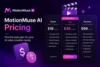
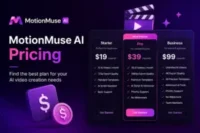
MotionMuse AI offers flexible pricing plans so users can start for free and upgrade when needed. It follows a credit-based system, where each video generation uses a specific number of credits. This makes it easy to control your usage.
1. Free Plan
The free plan is perfect for beginners. You get limited starting credits after sign-up. These credits let you test the tool and create a few sample videos. It is a good way to understand how MotionMuse AI works without paying anything.
2. Paid Plans
Paid plans are designed for users who need more videos and faster processing. These plans provide extra credits every month. You also get access to better features, faster rendering, and more templates for creative work.
3. Credits System
MotionMuse AI runs on credits. Every time you generate a video, credits are used. Simple videos use fewer credits, while advanced animations use more. If your credits finish, you can wait for renewal or upgrade your plan.
4. Is Free Version Enough?
The free version is good for practice and small experiments. You can try the basic features and learn the tool easily. But if you are a content creator or posting daily videos, the free plan is limited. In that case, a paid plan gives you more freedom and a smoother workflow.
Pros and Cons of MotionMuse AI
MotionMuse AI is a useful tool for creating short animated videos from images. Like every AI tool, it has strong points and a few limitations. Here is a simple breakdown:
Pros
- Easy to use for beginners with no editing skills needed
- Quickly turns images into short animated videos
- Saves time for content creators and marketers
- Offers ready-made templates for fast video creation
- Works well for social media content like reels and shorts
- Simple interface that is easy to understand
Cons
- Video length is very short (usually only a few seconds)
- Free credits are limited and can run out quickly
- Output quality depends on the quality of the uploaded image
- Sometimes processing can be slow during peak time
- Not suitable for long or advanced video editing projects
- Requires a stable internet connection to work properly
Is MotionMuse AI Worth Using?
MotionMuse AI can be a useful tool, but its value depends on how you plan to use it. It is simple, fast, and beginner-friendly. Let’s see who should use it and who may not find it enough
1. Is It Good for Beginners?
Yes, MotionMuse AI is a great choice for beginners. It is very easy to use. You only upload an image and get a video in seconds. No editing skills are needed. It is perfect for learning and basic practice.
2. Is It Good for Content Creators?
Yes, it works well for content creators. It helps you make short videos for platforms like Instagram, TikTok, and YouTube Shorts. It saves time and gives quick results. But it is not strong for advanced editing or long videos.
3. Is It Good for Free Users?
Free users can try MotionMuse AI, but it has limits. You only get a small number of credits. It is good for testing and learning. But for daily video creation, the free plan is not enough. A paid plan is better for regular use.
Best Alternatives to MotionMuse AI
If you want more advanced or different AI video tools, there are many good options available. These tools offer better quality, more control, or faster results depending on your need. Here are some popular MotionMuse AI alternatives:
1. PixVerse AI
PixVerse AI is great for creative and stylized videos. It is popular for making fun, viral social media content with strong visual effects. It is easy to use and good for beginners who want more variety.
2. Runway ML
Runway ML is a powerful professional AI video tool. It gives high-quality cinematic results and advanced editing options. It is best for creators who want full control and premium-level output.
3. Kling AI
Kling AI is known for realistic and smooth video generation. It produces cinematic motion and strong visual quality, making it ideal for reels, short films, and professional content.
4. Pika Labs
Pika Labs is fast and beginner-friendly. It is widely used for TikTok and YouTube Shorts. It offers creative effects and quick video generation for social media users.
5. Luma AI
Luma AI focuses on high-quality, realistic video generation with smooth camera movement. It is often used for cinematic scenes and creative storytelling projects.
These tools are strong alternatives if you want better quality, more features, or different creative styles compared to MotionMuse AI.
Conclusion
MotionMuse AI is a simple and useful tool for creating short animated videos from images. It is best for beginners and content creators who want fast and easy video results without editing skills.
It helps you save time and create engaging content for social media like TikTok, Instagram, and YouTube Shorts. The free plan is good for testing, but limited for regular use.
If you want quick and creative video content, MotionMuse AI is a good option to try.
Frequently Asked Questions (FAQs)
Here are some simple and common questions about MotionMuse AI. These answers will help you understand the tool better in an easy way.
Yes, MotionMuse AI has a free plan. You get limited credits when you sign up. These credits let you test the tool and create a few videos. For more usage, you may need a paid plan.
High-quality and clear images work best. Photos with good lighting and simple backgrounds give smoother animation. Blurry or dark images may not look good in the final video.
No, you do not need any editing skills. The tool is made for beginners. You just upload an image, select options, and the AI creates the video for you.
Yes, you can use old photos in MotionMuse AI. The tool can add motion and turn them into short animated videos. Clear and sharp photos give much better results.
It usually takes a few seconds to one minute. Time depends on the server load and image size. Sometimes it may take a bit longer during busy hours.

- Be Respectful
- Stay Relevant
- Stay Positive
- True Feedback
- Encourage Discussion
- Avoid Spamming
- No Fake News
- Don't Copy-Paste
- No Personal Attacks
- Be Respectful
- Stay Relevant
- Stay Positive
- True Feedback
- Encourage Discussion
- Avoid Spamming
- No Fake News
- Don't Copy-Paste
- No Personal Attacks
