10 Best Hedra AI Alternatives in 2026
Published: 13 Jul 2026
Hedra AI turns photos and audio into realistic talking avatar videos. It sounds perfect — until you hit its limits. The 720p resolution cap, expensive credit system, and no video-to-video lip sync push many creators to look elsewhere.
The good news? There are better options available in 2026. We tested the 10 best HEDRA alternatives—free and paid—so you can find the right AI video tool for your needs.
Let’s dive in.
What is Hedra AI?
Hedra AI is an AI-powered video generation platform. It turns still images and audio into realistic talking avatar videos. You simply upload a photo, add a voiceover or text, and Hedra brings that image to life with natural lip sync and facial expressions. No video editing skills needed.
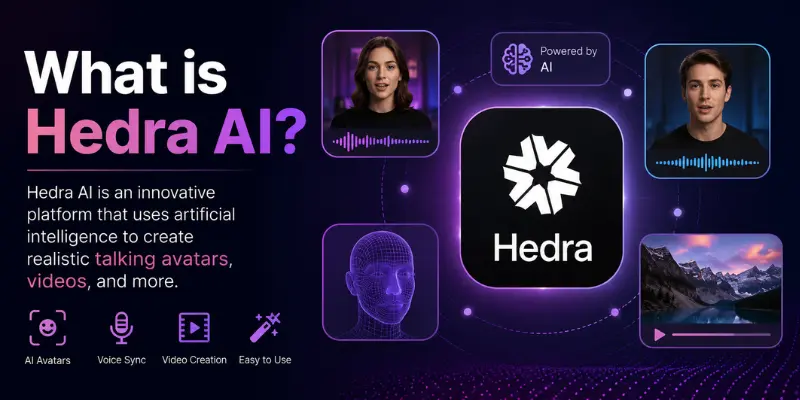
At the core of Hedra is its character-3 model. This model processes image, text, and audio all at the same time. The result is smooth, accurate lip sync that matches your audio almost perfectly. It supports over 140 languages, which makes it a popular choice for creators who produce content for global audiences.
Hedra works great for social media clips, marketing videos, product demos, and educational content. Coaches use it to create personalized video messages. Marketers use it to produce multilingual ad content without hiring voice actors. And content creators use it to build engaging avatar-driven videos in minutes — without ever stepping in front of a camera.
Why Are People Looking for Hedra Alternatives?
Hedra AI is useful — but it is far from perfect. Many creators and businesses are switching to Hedra alternatives in 2026. The reasons are consistent across the board. Let’s break them down one by one.
1. 720p Resolution Cap
Hedra’s Character-3 model maxes out at 720p resolution. In 2026, that is simply not enough. Most platforms—YouTube, Instagram, and LinkedIn—expect 1080p or higher for professional-looking content. If you are creating videos for clients or running a business, 720p will make your content look outdated. Many users switch to Hedra alternatives just for this reason alone.
2. Expensive Credit System
Hedra runs on a credit-based system — and those credits disappear fast. For example, the Character-3 model costs 6 credits per second. But if you use premium models like Sora 2 Pro, one 10-second video burns 700 credits. That is 70% of the Lite plan in a single generation. For regular creators, this makes Hedra an expensive tool very quickly.
3. No Video-to-Video Lip Sync
Hedra can only create lip sync from a still image and audio. It cannot re-lip-sync an existing video. This is a big limitation. Tools like HeyGen and Sync. so handle this natively and with ease. If you need to dub or re-sync an already recorded video, you will need a different Hedra alternative.
4. Credits Don’t Roll Over
On Hedra’s free plan, unused credits expire at the end of every billing cycle. You lose whatever you don’t use. This frustrates users who don’t create videos every single day. Most competing platforms offer more flexible credit policies—making them a smarter choice for occasional creators.
5. Unreliable Free Plan
Hedra’s free plan gives you 300 credits per month. But here is the problem—the free tier is frequently disabled during high-demand periods. Many users report being unable to access free generations at all. If you are testing the tool before paying, this inconsistency makes it very hard to evaluate properly.
6. Limited Editing Tools
Hedra focuses on avatar generation — and that’s it. There is no built-in timeline editor, no transitions, no audio mixing, and no post-production tools. Once your avatar video is generated, you have to take it to another platform to finish it. This adds extra steps and extra cost. Many Hedra alternatives offer all of these features in one place.
What to Look for in a Hedra Alternative?
Not every AI video tool is worth your time or money. Before you pick a Hedra alternative, you need to know what actually matters. Here are the six key things to check before making your decision.
1. Facial Stability and Motion Consistency
This is the most important factor. A good Hedra alternative should produce smooth, natural facial movements across every frame. No jitter. No unnatural blinking. No micro-glitches. Think about it — if your avatar looks robotic or unstable, viewers will stop watching immediately. Always test how the tool handles subtle expressions and longer video clips before committing.
2. Text-to-Video Capabilities
Some tools go beyond talking heads. They generate full video scenes directly from a text prompt. This opens up a whole new level of creative freedom — from explainer videos to brand storytelling to dynamic social media content. If you want more than just a speaking avatar, look for a Hedra alternative that offers strong text-to-video generation.
3. Resolution and Output Quality
Always check the maximum resolution a tool supports. In 2026, anything below 1080p is not acceptable for professional content. Look for tools that offer 1080p or higher output, clean audio sync, and sharp visuals. If you plan to use your videos for ads, presentations, or client work — output quality is non-negotiable.
4. Customization and Control
A strong Hedra alternative should give you real control over your content. That means choosing voice style, adjusting pacing, editing character appearance, and controlling scene composition. The more control you have, the more your videos will match your brand and connect with your audience.
5. Built-in Editing Tools
Why generate a video and then jump to another tool to finish it? The best Headra alternatives come with built-in editing features—timeline editors, transitions, audio mixing, captions, and effects—all in one place. This saves time, reduces cost, and keeps your workflow simple and smooth.
6. Pricing Transparency
Hidden fees and confusing credit systems are a red flag. A trustworthy Hedra alternative should show you exactly what you are paying for. Look for clear monthly plans, predictable per-video costs, and no surprise charges. If the pricing page confuses you—move on and find a tool that respects your budget.
10 Best Hedra Alternatives at a Glance
Before we dive into the details, here is a quick side-by-side comparison of the best Hedra alternatives in 2026. Use this table to find your best match in seconds.
| Tool | Best For | Free Plan | Starting Price | Lip Sync | Resolution | API Access |
| HeyGen | Business & multilingual videos | ✅ Yes | $29/mo | ✅ Excellent | 1080p | ✅ Yes |
| Synthesia | Corporate & training videos | ✅ Yes | $29/mo | ✅ Good | 1080p | ✅ Yes |
| Runway | Creative & cinematic videos | ✅ Yes | $12/mo | ❌ No | 1080p+ | ✅ Yes |
| Kling AI | Affordable full video generation | ✅ Yes | $6.99/mo | ✅ Good | 1080p | ✅ Yes |
| D-ID | Quick avatar & presenter videos | ✅ Yes | $4.70/mo | ✅ Good | 1080p | ✅ Yes |
| Sync.so | Studio-grade lip sync | ✅ Yes | $5/mo | ✅ Studio-grade | 1080p | ✅ Yes |
| Pika | Short creative social clips | ✅ Yes | Free | ⚠️ Basic | 1080p | ✅ Yes |
| VEED | Editing + AI video in one place | ✅ Yes | $18/mo | ✅ Good | 1080p | ❌ No |
| Morphed | All-in-one creative platform | ✅ Yes | Free tier | ⚠️ Model-based | 1080p | ❌ No |
| SadTalker | Free open-source lip sync | ✅ Free | Free | ✅ Basic | 720p | ❌ No |
10 Best Hedra Alternatives in 2026
These tools were selected based on real user feedback, features, pricing, and actual use cases. Let’s break them down one by one.
1. HeyGen — Best Hedra Alternative for Business Videos
HeyGen is one of the most powerful AI avatar and video generation platforms available in 2026. You create a custom avatar, add your script, and HeyGen produces a polished, lip-synced video in minutes. It supports over 175 languages—making it a top choice for businesses that create multilingual content at scale.
Key Features:
- Avatar IV model for highly expressive lip sync
- 175+ language support with voice translation
- Video-to-video lip sync for existing footage
- Custom avatar creation from your own image or video
- Built-in video editor with templates
- API access for automated video production
Pros:
- ✅ Best-in-class avatar expressiveness
- ✅ Excellent multilingual support
- ✅ Video-to-video lip sync available
- ✅ Clean and professional output quality
- ✅ Free plan available
Cons:
- ❌ Starts at $29/month — pricier than some alternatives
- ❌ Free plan has strict usage limits
- ❌ No cinematic text-to-video generation
Pricing:
- Free plan available
- Paid plans start at $29/month
Best for: Businesses and marketers who need professional, multilingual avatar videos at scale.
2. Synthesia—Best Hedra Alternative for Corporate Training Videos
Synthesia is a professional AI video platform built specifically for business use. It lets you create presenter-style videos using AI avatars — without cameras, studios, or actors. It is widely used by HR teams, educators, and corporate trainers to produce clean, consistent video content quickly.
Key Features:
- 160+ AI avatars with natural expressions
- 160+ languages and accent support
- Custom avatar creation from your own likeness
- Built-in slide and template editor
- SCORM export for e-learning platforms
- API access for enterprise workflows
Pros:
- ✅ Perfect for training and educational content
- ✅ Very clean and consistent video output
- ✅ Easy to use — no technical skills needed
- ✅ Strong enterprise and team features
- ✅ Free plan available
Cons:
- ❌ Starts at $29/month
- ❌ Not designed for creative or cinematic videos
- ❌ Limited customization for advanced users
Pricing:
- Free plan available
- Paid plans start at $29/month
Best for: Corporate teams, HR departments, and educators who need professional training and explainer videos fast.
3. Runway—Best Hedra Alternative for Creative Video Generation
Runway is a next-generation AI creative platform that goes far beyond talking avatars. It generates full cinematic video scenes from text prompts, images, or existing footage. If you are a filmmaker, creative director, or content creator who wants more than just a speaking head — Runway is the tool for you.
Key Features:
- Gen-4.5 model for high-quality text-to-video generation
- Image-to-video and video-to-video transformation
- Built-in video editor with effects and transitions
- Motion brush for precise object animation control
- 1080p and higher resolution output
- API access for production workflows
Pros:
- ✅ Best-in-class cinematic video generation
- ✅ Powerful creative control and editing tools
- ✅ High resolution output — 1080p and above
- ✅ Works with existing footage and images
- ✅ Free plan available
Cons:
- ❌ No dedicated lip sync or avatar feature
- ❌ Can be complex for absolute beginners
- ❌ Credits run out quickly on lower plans
Pricing:
- Free plan available
- Paid plans start at $12/month
Best for: Filmmakers, creative directors, and content creators who need cinematic AI video beyond basic talking avatars.
4. Kling AI — Best Affordable Hedra Alternative
Kling AI is a powerful and budget-friendly AI video generation platform. It produces high-quality videos from text prompts and images — with surprisingly realistic motion and audio sync. At just $6.99 per month, it offers incredible value compared to most Hedra alternatives on this list.
Key Features:
- Kling 3.0 Omni model for realistic video generation
- Native audio-to-video sync capabilities
- Text-to-video and image-to-video generation
- 1080p resolution output
- Fast generation speed
- API access for developers
Pros:
- ✅ Most affordable paid plan on this list
- ✅ Surprisingly high output quality for the price
- ✅ Good audio sync capabilities
- ✅ Fast generation times
- ✅ Free plan available
Cons:
- ❌ Avatar expressiveness not as strong as HeyGen
- ❌ Fewer editing tools compared to VEED or Runway
- ❌ Less language support than Synthesia or HeyGen
Pricing:
- Free plan available
- Paid plans start at $6.99/month
Best for: Budget-conscious creators who want solid AI video generation without spending a lot every month.
5. D-ID — Best Hedra Alternative for Quick Avatar Videos
D-ID is one of the original AI talking avatar platforms. It turns still photos into natural, lip-synced presenter videos in seconds. It is simple, fast, and affordable — making it a great entry-level Hedra alternative for solo creators, small businesses, and educators.
Key Features:
- Fast talking avatar creation from still images
- 30+ language support for voice and lip sync
- Custom AI presenter creation
- API access for automated video workflows
- Simple and clean user interface
- Integration with PowerPoint and Google Slides
Pros:
- ✅ Very affordable starting price
- ✅ Fast and simple to use
- ✅ Good lip sync quality for the price
- ✅ API access available
- ✅ Free plan available
Cons:
- ❌ Fewer languages than HeyGen or Synthesia
- ❌ Limited creative and editing features
- ❌ Output quality not as polished as premium tools
Pricing:
- Free plan available
- Paid plans start at $4.70/month
Best for: Solo creators and small businesses who need quick, affordable avatar videos without a steep learning curve.
6. Sync.so — Best Hedra Alternative for Studio-Grade Lip Sync
Sync.so is built for one thing — and it does it better than almost anyone else. It specializes in studio-grade lip sync for existing videos. If you have a recorded video and need to dub it into another language or re-sync the audio perfectly, Sync.so is your best option. This is exactly what Hedra cannot do.
Key Features:
- Studio-grade lip sync for existing video footage
- Video-to-video lip sync and dubbing
- Multi-language dubbing support
- Per-second billing for cost efficiency
- API access for production pipelines
- Fast processing with high accuracy
Pros:
- ✅ Best lip sync quality for existing videos
- ✅ Lowest starting price on this list at $5/month
- ✅ API access for developers and studios
- ✅ Very accurate and natural lip movement
- ✅ Free plan available
Cons:
- ❌ No avatar creation from still images
- ❌ No text-to-video or image-to-video generation
- ❌ Limited creative features beyond lip sync
Pricing:
- Free plan available
- Paid plans start at $5/month
Best for: Video producers, dubbing studios, and developers who need precise, high-quality lip sync for existing video content.
7. Pika — Best Free Hedra Alternative for Social Media Clips
Pika is a fun and fast AI video generation tool built for short-form social media content. You describe what you want, and Pika generates a short, creative video clip in seconds. It is not a lip sync tool — but for dynamic, eye-catching social media content, it is one of the best free Hedra alternatives available right now.
Key Features:
- Pika 2.5 model for fast video generation
- Text-to-video and image-to-video creation
- Creative effects and motion styles
- 1080p video output
- Free plan with 80 monthly credits
- API access for developers
Pros:
- ✅ Very generous free plan
- ✅ Fast and fun to use
- ✅ Great for creative social media content
- ✅ 1080p output on free plan
- ✅ No technical skills required
Cons:
- ❌ Basic lip sync — not suitable for avatar videos
- ❌ Short video clips only
- ❌ Limited control over fine details
Pricing:
- Free plan with 80 monthly credits
- Paid plans available at affordable rates
Best for: Social media creators who need fast, creative video clips without spending any money.
8. VEED — Best Hedra Alternative for Editing Plus AI Video
VEED is the perfect tool if you want AI video generation and powerful editing features all in one place. You can create AI avatar videos, add captions, apply transitions, mix audio, and export polished content — without ever leaving the platform. It saves you the extra step of jumping between tools.
Key Features:
- AI avatar video creation with lip sync
- Automatic caption and subtitle generation
- Built-in timeline editor with transitions and effects
- Audio mixing and noise removal
- Screen recording and video trimming tools
- 1080p video export
Pros:
- ✅ All-in-one video creation and editing platform
- ✅ Very beginner-friendly interface
- ✅ Automatic captions save a lot of time
- ✅ Great for social media and marketing content
- ✅ Free plan available
Cons:
- ❌ No API access
- ❌ Avatar quality not as advanced as HeyGen
- ❌ Full features require a paid plan
Pricing:
- Free plan available
- Paid plans start at $18/month
Best for: Content creators and marketers who want AI video generation and editing tools in a single, easy-to-use platform.
9. Morphed — Best All-in-One Creative Hedra Alternative
Morphed is a powerful all-in-one AI creative platform. It gives you access to 15+ AI models for image generation, video generation, upscaling, and more — all inside one connected workspace. If Hedra feels too narrow and limiting, Morphed gives you a much broader creative environment to work in.
Key Features:
- 15+ AI models for image and video generation
- Free-flowing visual Canvas for scene layout
- Built-in Copilot for ideation and asset generation
- Compose timeline editor with transitions and audio
- Layer-based editing for per-element control
- Live collaboration for teams on Pro plans
Pros:
- ✅ Widest range of AI models on this list
- ✅ All-in-one creative workspace
- ✅ Great for teams with live collaboration
- ✅ Free tier available
- ✅ Regular model updates and new features
Cons:
- ❌ Lip sync depends on the model used
- ❌ Can feel overwhelming for beginners
- ❌ No dedicated avatar creation tool
Pricing:
- Free tier available
- Paid plans available — pricing varies by model usage
Best for: Creative professionals and teams who need a full AI creative studio beyond just talking avatar videos.
10. SadTalker—Best Free Open-Source Hedra Alternative
SadTalker is a free, open-source tool that animates facial images using audio-driven lip sync. It works similarly to Hedra’s core feature—but it costs nothing. You upload a photo, add audio, and SadTalker generates a realistic facial animation with natural blinking, head movement, and lip sync. It is ideal for developers and budget-conscious creators who do not mind a more hands-on setup.
Key Features:
- Audio-driven lip sync from still images
- Natural blink and head movement generation
- Improved nuanced facial expression control
- Completely free and open-source
- Can run locally on your own machine
- An active developer community for support
Pros:
- ✅ 100% free — no subscriptions or credits
- ✅ Good lip sync quality for a free tool
- ✅ Natural facial animation with head movement
- ✅ Full control — runs on your own machine
- ✅ No watermarks on output
Cons:
- ❌ Requires technical setup—not beginner-friendly
- ❌ Output capped at 720p
- ❌ No built-in editing or post-production tools
- ❌ No cloud platform — local installation required
Pricing:
- Completely free and open-source
Best for: Developers and tech-savvy creators who want a free, no-subscription lip sync tool they can run and control locally.
How to Choose the Right Hedra Alternative?
With so many options, picking the right tool can feel confusing. But it doesn’t have to be. The best Hedra alternative is simply the one that matches your use case, skill level, and budget. Answer these simple questions and you will know exactly where to start.
Are You a Social Media Creator?
You need fast, visually engaging content. You don’t want to spend hours editing. You just want to create, publish, and grow your audience. Speed and creativity matter more than anything else.
Go with:
- 🟢 Pika — Fast, fun, and free for short creative clips
- 🟢 VEED — AI video generation plus editing in one place
- 🟢 Kling AI — Affordable and high quality for dynamic content
Quick tip: Start with Pika’s free plan. If you need more editing control, upgrade to VEED. If you want better video quality at low cost, Kling AI is your next step.
Are You a Business or Corporate Team?
You need professional, polished videos. Think training materials, product demos, onboarding content, and multilingual presentations. Quality and consistency are non-negotiable for your brand.
Go with:
- 🔵 HeyGen — Best avatar expressiveness with 175+ language support
- 🔵 Synthesia — Perfect for training videos and e-learning content
- 🔵 VEED — Great for quick marketing and promotional videos
Quick tip: Choose HeyGen if multilingual content is a priority. Choose Synthesia if you produce a lot of corporate training or HR videos. Both offer free plans to test before you commit.
Are You on a Tight Budget?
You want quality AI video output without spending a fortune every month. The good news is that some of the best Hedra alternatives are either free or very affordable — and still deliver strong results.
Go with:
- 🟠 SadTalker — 100% free and open-source lip sync tool
- 🟠 D-ID — Solid avatar videos starting at just $4.70/month
- 🟠 Sync.so — Studio-grade lip sync at only $5/month
- 🟠 Kling AI — Full video generation starting at $6.99/month
Quick tip: Start free with SadTalker if you are comfortable with a basic technical setup. If you want a simple cloud-based tool, D-ID or Sync.so give you the best value for money.
Are You a Developer Who Needs API Access?
You are building a product, automating a workflow, or integrating AI video into your platform. You need reliable API access, stable outputs, and flexible billing options.
Go with:
- 🟣 HeyGen — Robust API for automated avatar video production
- 🟣 Synthesia — Strong API with enterprise-grade reliability
- 🟣 Sync.so — API-first platform built for production pipelines
- 🟣 D-ID — Simple and affordable API for quick integrations
- 🟣 Runway — Powerful API for cinematic video generation workflows
Quick tip: If you need avatar videos via API, go with HeyGen or Synthesia. If you need lip sync integrated into an existing video pipeline, Sync.so is the cleanest API option available.
Still Not Sure? Use This Quick Decision Guide
| Your Situation | Best Hedra Alternative |
| I create short social media clips | Pika or Kling AI |
| I need multilingual business videos | HeyGen |
| I produce corporate training content | Synthesia |
| I want AI video plus editing in one tool | VEED |
| I need lip sync for existing videos | Sync.so |
| I want cinematic text-to-video | Runway |
| I am on a very tight budget | SadTalker or D-ID |
| I need API access for my product | HeyGen or Sync.so |
| I want an all-in-one creative platform | Morphed |
| I want free open-source lip sync | SadTalker |
Hedra vs Top Alternatives — Key Differences
Hedra is a solid starting point for AI avatar videos. But how does it actually compare to the top alternatives? Let’s look at three direct, honest comparisons — no fluff, just the facts.
Hedra vs HeyGen
Both tools create AI avatar videos with lip sync. But the differences are significant once you look closely.
HeyGen’s Avatar IV model produces far more expressive and natural-looking avatars than Hedra’s Character-3. HeyGen also supports video-to-video lip sync — something Hedra simply cannot do. And with 175+ language support, HeyGen is the clear winner for multilingual content. Hedra has a lower entry price, but HeyGen gives you significantly more value for the money you spend.
| Feature | Hedra | HeyGen |
| Avatar Expressiveness | ⚠️ Good | ✅ Excellent |
| Lip Sync Quality | ✅ Good | ✅ Excellent |
| Video-to-Video Lip Sync | ❌ No | ✅ Yes |
| Language Support | ✅ 140+ | ✅ 175+ |
| Max Resolution | ❌ 720p | ✅ 1080p |
| Built-in Editor | ❌ No | ✅ Yes |
| Starting Price | $8/mo | $29/mo |
| Free Plan | ✅ Yes | ✅ Yes |
| API Access | ❌ No | ✅ Yes |
Verdict: HeyGen wins on almost every front. If you need professional avatar videos with strong lip sync and multilingual support, HeyGen is the better investmen
Hedra vs Synthesia
Hedra and Synthesia both target video creators — but they serve very different audiences. Hedra is more flexible for individual creators. Synthesia is built specifically for business and corporate use.
Synthesia offers 160+ polished AI avatars with consistent, professional output. It includes a built-in slide editor and supports SCORM export for e-learning platforms — features Hedra doesn’t have at all. However, Synthesia is not designed for creative or cinematic content. If you need corporate training videos, Synthesia wins. If you need more creative freedom, Hedra or other alternatives may suit you better.
| Feature | Hedra | Synthesia |
| Avatar Quality | ✅ Good | ✅ Very Good |
| Lip Sync Accuracy | ✅ Good | ✅ Good |
| Corporate Training Focus | ❌ No | ✅ Yes |
| SCORM Export | ❌ No | ✅ Yes |
| Max Resolution | ❌ 720p | ✅ 1080p |
| Built-in Editor | ❌ No | ✅ Yes |
| Language Support | ✅ 140+ | ✅ 160+ |
| Starting Price | $8/mo | $29/mo |
| Free Plan | ✅ Yes | ✅ Yes |
| API Access | ❌ No | ✅ Yes |
Verdict: For corporate teams and educators, Synthesia is the smarter choice. For individual creators who want more flexibility, Hedra holds its own — but still loses on resolution and editing tools.
Hedra vs Kling AI
This is the most interesting comparison for budget-conscious users. Kling AI costs less than Hedra on paid plans — yet delivers more creative flexibility and better overall video quality.
Kling AI generates full video scenes from text prompts and images — not just talking heads. It also handles audio-to-video sync natively and outputs at 1080p. Hedra is still stronger for pure lip sync from a still photo. But if you want more than just an avatar video, Kling AI gives you far more creative power at a lower monthly cost.
| Feature | Hedra | Kling AI |
| Talking Avatar Creation | ✅ Yes | ⚠️ Limited |
| Text-to-Video Generation | ❌ No | ✅ Yes |
| Audio-to-Video Sync | ✅ Yes | ✅ Yes |
| Max Resolution | ❌ 720p | ✅ 1080p |
| Built-in Editor | ❌ No | ⚠️ Basic |
| Language Support | ✅ 140+ | ❌ Limited |
| Starting Price | $8/mo | $6.99/mo |
| Free Plan | ⚠️ Unreliable | ✅ Yes |
| API Access | ❌ No | ✅ Yes |
Verdict: For pure talking avatar videos, Hedra has a slight edge. But for overall value, creative flexibility, and better resolution, Kling AI is the stronger and more affordable choice.
Conclusion
Hedra AI is a decent tool for basic avatar videos. But as we have seen in this guide, it falls short in some important areas. The 720p resolution cap, unreliable free plan, expensive credits, and lack of editing tools make it a frustrating choice for serious creators and businesses.
The good news is that 2026 has no shortage of strong Hedra alternatives. If you need professional multilingual avatar videos, HeyGen is the clear winner. If you create corporate training content, Synthesia is your best bet. For creative social media clips on a budget, Pika and Kling AI deliver great results without breaking the bank. If you need studio-grade lip sync for existing videos, Sync.so is unmatched. And if you want a completely free option, SadTalker gets the job done without any subscriptions.
There is no single best Hedra alternative for everyone. But there is definitely a best one for you based on your content type, skill level, and budget. Start with the free plan of whichever tool fits your needs. Test it with a real project. Most platforms on this list let you get started in minutes with no credit card required.
The best AI video tool is the one that helps you create better content faster. You now have everything you need to make the right choice. Go create something great.
Found this guide helpful? Share it with a fellow creator or marketer who is still stuck on Hedra. And if you have tried any of these tools yourself, drop your experience in the comments below. We would love to hear what worked for you
FAQs
Yes, there are many free Hedra alternatives available. Tools like Canva, CapCut, and Pika offer free plans with basic AI video features. These free versions are good for beginners and small projects.
HeyGen is one of the best Hedra alternatives for lip sync videos. It creates realistic facial movements and accurate voice syncing. Many creators use it for talking avatar videos and AI presenters.
Synthesia is a strong choice for business videos. It helps companies create training videos, presentations, and marketing content with professional AI avatars and voiceovers.
HeyGen offers more advanced avatar features, better lip sync, and more customization options than Hedra. However, Hedra may still work well for users who want a simpler and easier interface.
Canva and CapCut are among the cheapest Hedra alternatives. They provide affordable plans and even free versions for basic AI video editing and content creation.
Runway and Synthesia are known for high-quality video output. They support HD and cinematic-style video generation with clear visuals and smooth effects.



- Be Respectful
- Stay Relevant
- Stay Positive
- True Feedback
- Encourage Discussion
- Avoid Spamming
- No Fake News
- Don't Copy-Paste
- No Personal Attacks
- Be Respectful
- Stay Relevant
- Stay Positive
- True Feedback
- Encourage Discussion
- Avoid Spamming
- No Fake News
- Don't Copy-Paste
- No Personal Attacks
